Table of Contents
Hardware
- Apple M3 Ultra vs RTX 5090 – The Final Battle – equivalent on small models, but M3 Ultra is better on big models like DeepSeek R1 Distill Llama 70B
- Comparison of M3 Ultra & RTX 5090 32GB & RTX Pro 6000 96GB has an outcome that it is better to build RTX Pro 6000 system rather than Apple M3 Ultra for $10000 (price of M3 Ultra wit 512GB of RAM)
- Wire eight DGX Sparks into a 1TB “VRAM” cluster – one would need a 4400Gbps switch and QSFP56 cables (~€65).
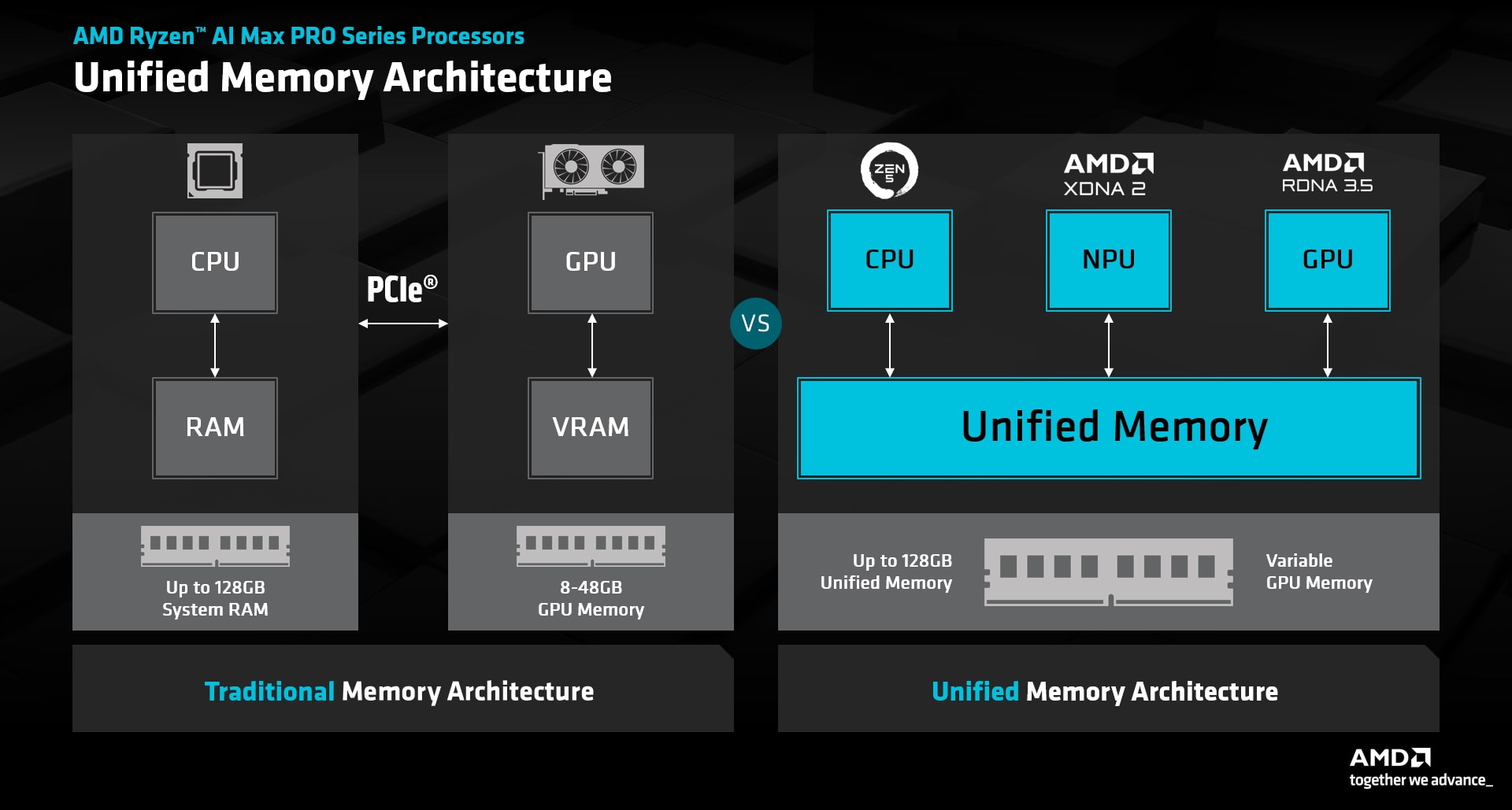
- Running LLM on AMD "Strix Halo" AI Ryzen MAX+ 395 (HP Z2 G1a Mini Workstation) – Linux tuning and software configuration
- M4 Mac Mini cluster connected via Thunderbolt.
- Comparison of Jetson Thor, DGX Spark, and Apple Silicon M4 Pro all having unified 128GB of RAM with 273GB/s memory bandwidth.
- Stress-testing the NVIDIA DGX Spark, Dell Pro Max GB10, ASUS Ascent GX10, and MSI Edge Expert all running the same Grace Blackwell (GB10) chip and 128GB of unified RAM.
- NVIDIA upcoming N1 laptop SoC with 128GB LPDDR5X memory
AMD chipset
| Name | Price | CPU | GPU | Memory | Storage | Display ports | Extension slots | Connectivity | Wireless | Dimensions | Max TFLOPS | Tokens/sec (120B Q4) | Tokens / € | Tokens / W | Clustering |
|---|---|---|---|---|---|---|---|---|---|---|---|---|---|---|---|
| Framework Desktop | €3591 | AMD Ryzen™ AI Max+ 395, 3.0GHz, 16 cores | AMD Radeon™ 8060S, 2.9GHz, 20 compute units | 128GB LPDDR5x, 8000 MT/s | 1TB, 2× NVMe PCIe 4.0 ×4 M.2 2280, max 8TB each | 1× HDMI v2.1, 2× DisplayPort v1.4 (8K@60Hz) | 1× PCIe 4.0 ×4 slot (max 50GbE) | RJ45 5Gbit (Realtek RTL8126), 2× USB4-C, 2× USB-A 3.2 Gen 2 | WiFi 7 (AMD RZ717) | 123.7×123.1×54.6mm | ~50–60 FP16 | 12–15 | 0.0055–0.0075 | 0.10–0.14 |  Either Ethernet (bad), or adding 50GbE QSFP28 PCIe adapter + cables Either Ethernet (bad), or adding 50GbE QSFP28 PCIe adapter + cables |
| Bosgame M5 AI | €2080 (pre-order $1699) | AMD Ryzen™ AI Max+ 395, 3.0GHz, 16 cores | AMD Radeon™ 8060S, 2.9GHz, 20 compute units | 128GB LPDDR5x, 8000 MT/s | 2TB, 2× NVMe PCIe 4.0 ×4 M.2 2280, max 8TB each | 1× HDMI v2.1, 1× DisplayPort v1.4 (8K@60Hz) | RJ45 2.5Gbit, 2× USB4-C, 3× USB-A 3.2 Gen 2, 2× USB-A 2.0, SD card | WiFi 7, Bluetooth 5.2 (in M.2 2230 key-E PCIe 3.0 slot) | |  |
|||||
| GEEKOM A9 Mega AI Mini PC | $3200 / €3500 (kickstarter $1899) | AMD Ryzen™ AI Max+ 395, 3.0GHz, 16 cores | AMD Radeon™ 8060S, 2.9GHz, 20 compute units | 128GB LPDDR5x, 8000 MT/s | 2TB, 2× NVMe PCIe 4.0 ×4 M.2 2280, max 8TB each | 2× HDMI v2.1 (8K@60Hz) | 2× RJ45 2.5Gbit, 2× USB4-C (support Display Port 2.1), 2× USB-C, 3× USB-A 3.2 Gen 2, SD card | WiFi 7, Bluetooth 5.4 (in M.2 2230 key-E PCIe 3.0 slot) | 171×171×71mm | |
|||||
| GMKtec EVO-X2 | €3000 | AMD Ryzen™ AI Max+ 395, 3.0GHz, 16 cores | AMD Radeon™ 8060S, 2.9GHz, 20 compute units | 128GB LPDDR5x, 8000 MT/s | 2TB, 2× NVMe PCIe 4.0 ×4 M.2 2280, max 8TB each | 1× HDMI v2.1, 1× DisplayPort v1.4 (8K@60Hz) | RJ45 2.5Gbit, 2× USB4-C, 3× USB-A 3.2 Gen 2, 2× USB-A 2.0, SD card | WiFi 7, Bluetooth 5.4 (in M.2 2230 key-E PCIe 3.0 slot) | 193×185.8×77mm | |
|||||
| Beelink GTR9 Pro | €3000 | AMD Ryzen™ AI Max+ 395, 3.0GHz, 16 cores | AMD Radeon™ 8060S, 2.9GHz, 20 compute units | 128GB LPDDR5x, 8000 MT/s | 2TB, 2× NVMe PCIe 4.0 ×4 M.2 2280, max 8TB each | 1× HDMI v2.1 (8K@60Hz) | 2× RJ45 40Gbit, 3× USB4-C, 2× USB-A 3.2 Gen 2, 2× USB-A 2.0, SD card | WiFi 7 (MT7925), Bluetooth 5.4 (in M.2 2230 key-E PCIe 3.0 slot) | 180×180×90.8mm | Maybe 2×40Gbit = 10MB/s |
|||||
| FEVM FA-EX9 | €2950 | AMD Ryzen™ AI Max+ 395, 3.0GHz, 16 cores | AMD Radeon™ 8060S, 2.9GHz, 20 compute units | 128GB LPDDR5x, 8000 MT/s | 2TB, NVMe PCIe 4.0 ×4 + 1× M.2 2280, max 8TB each | 1× HDMI v2.1, 1× DisplayPort v1.4 (8K@60Hz) | OCuLink 64Gb/s | RJ45 2.5Gbit, 2× USB4-C, 3× USB-A 3.2 Gen 2, 2× USB-A 2.0, SD card | WiFi 7 (MT7925), Bluetooth 5.3 (in M.2 2230 key-E PCIe 3.0 slot) | 192×190×55mm | OCuLink | ||||
| MINISFORUM MS-S1 MAX | €3120 | AMD Ryzen™ AI Max+ 395, 3.0GHz, 16 cores | AMD Radeon™ 8060S, 2.9GHz, 20 compute units | 128GB LPDDR5x, 8000 MT/s | 2TB, NVMe PCIe 4.0 ×4 + 1× M.2 2280, max 8TB each | 1× HDMI v2.1 (8K@60Hz) | 1× PCIe 4.0 ×4 slot | 2× RJ45 10Gbit (Realtek RTL8127), 2× USB4v2-C (80Gb/s, Display Port 2.0, PD out 15W), 2× USB4-C (40Gb/s, Display Port 2.0, PD out 15W), 3× USB-A 3.2 Gen 2, 2× USB-A 2.0, SD card | WiFi 7 (MT7925), Bluetooth 5.4 (in M.2 2230 key-E PCIe 3.0 slot) | 192×190×55mm | See above using MCX416A-CCAT Mellanox ConnectX-4 2× 50Gbit/s QSFP28 ($146) | ||||
| MINISFORUM N5 Max | $2599 | AMD Ryzen™ AI Max+ 395, 3.0GHz, 16 cores | AMD Radeon™ 8060S, 2.9GHz, 20 compute units | 64GB LPDDR5x, 8000 MT/s | barebone, NVMe PCIe 4.0 ×4 + 3× M.2 2280 ×1, max 8TB each, 5× 3.5″/2.5″ SATA drives | 1× HDMI v2.1 (8K@60Hz) | 1× PCIe 4.0 ×4 slot | 2× RJ45 10Gbit, 2× USB4v2-C (80Gb/s), 1× USB4-C (40Gb/s), 2× USB-A 3.2 Gen 2, 1× USB-A 2.0, SD card | WiFi 7 (MT7925), Bluetooth 5.4 (in M.2 2230 key-E PCIe 3.0 slot) | 199×202×252mm | OCuLink (external PCIe 4.0 ×4) |
- MINISFORUM BD395i MAX is a mini ITX motherboard featuring full-size PCIe ×16 slot
- FEMV FAEX1 features 3× M.2 2280 PCIe 4.0 ×4 slot and OCuLink port, but it too pricy (€4300 for 128GB + 1TB version)
- Aoostar NEX395 Ryzen AI Max+ 395 features 3× M.2 2280 PCIe 4.0 ×4 slot and LPDDR5x 8533 MT/s
 for €3500.
 - ONEXPLAYER AMD Ryzen AI Max+ 395 128GB / 1TB for $2999.
- PELADN YO2 mini PC for $3030 features 3× M.2 2280 PCIe 4.0 ×4 slots
- Thermalright AI HydroNous R1 (not released as to 2026-04-15) features 3× M.2 2280 PCIe 4.0 ×4 slot, and liquid cooling (review)
- Thermalright Strix Halo mini PC announced, also liquid cooled
- Acer Veriton RA100 AI Mini Workstation, MOREFINE H1, Corsair AI Workstation 300 have similar specs and prices.
Renting GPU
Future
NVidia chipset:
Old-school but interesting
- Nvidia Tesla V100 в работе и играх – сравнение Tesla V100 с 3090, 4090, 5090 по TFLOPS, Что может серверная Tesla V100 в играх? – установка самых последних драйверов на NVidia Tesla V100 PG503.
- Cheap GMKtec Mini PC with 96GB RAM runs a 70B LLM in Intel Core Ultra CPU using Intel® LLM Library (discontinued), but checkout Geekom A9 Max with AMD Ryzen AI Max runs 120B LLM
LLM
- Free models on OpenRouter or use ''openrouter/free'' model router. Note that you need to add $10 credits to your account in order the limit for free models to increase from 50 to 1000 API requests per day.
- All models on Kilo Code / Kilo Benchmark, however notice that one cannot force a particular model: either “free” or “non-free” options are available (“smart” routing):
# docker compose exec openclaw-gateway /app/openclaw.mjs models list --provider kilocode

Model                                      Input      Ctx      Local Auth  Tags
kilocode/kilo-auto/free                    text       977k     no    yes   default
kilocode/kilo/auto                         text+image 977k     no    yes   configured,alias:Kilo Gateway
Software
- LM Studio – run AI models, locally and privately
- "speculative decoding" is a technique to dramatically boost Large Language Model speed using a smaller model drafts ahead, while a larger model verifies
- OpenMonoAgent – a full coding agent that lives in your box
OpenClaw
Install OpenClaw
- Add new
openclawuser:useradd -m -u 987 -g 1001 -s /usr/sbin/nologin openclaw && mkdir -m 700 /home/openclaw && chown openclaw:openclaw /home/openclaw - Make sure that
gateway.auth.tokenin/home/openclaw/.openclaw/openclaw.jsonmatches the one indocker-compose.yaml(openclaw-gateway.environment.OPENCLAW_GATEWAY_TOKEN). - Start/stop the container:
docker compose up -d openclaw-gateway/docker compose down - To approve device (OpenClaw UI) request:
# docker compose exec openclaw-gateway bash

$ /app/openclaw.mjs devices list
Direct scope access failed; using local fallback.
Pending (1)
┌──────────────────────────────────────┬───────────────────────────────────────────────────┬──────────┬───────────────┬──────────┬────────┐
│ Request                              │ Device                                            │ Role     │ IP            │ Age      │ Flags  │
├──────────────────────────────────────┼───────────────────────────────────────────────────┼──────────┼───────────────┼──────────┼────────┤
│ 4ec7a9d0-f5f2-4316-9c07-f9e4fa96620a │ f74fdd392ee3bca006e344a86554ef76b473d7e2bd8502fde │ operator │               │ just now │        │
└──────────────────────────────────────┴───────────────────────────────────────────────────┴──────────┴───────────────┴──────────┴────────┘

$ /app/openclaw.mjs devices approve 4ec7a9d0-f5f2-4316-9c07-f9e4fa96620a
Direct scope access failed; using local fallback.
Approved f74fdd392ee3bca006e344a86554ef76b473d7e2bd8502fde (4ec7a9d0-f5f2-4316-9c07-f9e4fa96620a)
- If you get the following error
Control UI requires gateway.controlUi.allowedOrigins (set explicit origins), or set gateway.controlUi.dangerouslyAllowHostHeaderOriginFallback=true to use Host-header origin fallback
mode
then add the following to.openclaw/openclaw.json:"gateway": { "controlUi": { "allowedOrigins": [ "http://localhost" ] } }
and force that host in Apache configuration:
RequestHeader set Origin "http://localhost:18789"
- To workaround OpenClaw error “Proxy headers detected from untrusted address. Connection will not be treated as local.” add the following to Apache configuration:
ProxyAddHeaders Off
- To force OpenClaw to bind to
localhostinstead of*, make sure thatOPENCLAW_GATEWAY_BINDis not set (remove lines that configure ''--bind'' and ''--port'') and configure those via.openclaw/openclaw.json"gateway": { "port": 18789, "mode": "local", "bind": "loopback" }Then check logs:
openclaw-gateway-1  | 2026-04-05T17:55:40.225+00:00 [canvas] host mounted at http://127.0.0.1:18789/__openclaw__/canvas/ (root /home/node/.openclaw/canvas)
openclaw-gateway-1  | 2026-04-05T17:55:40.296+00:00 [gateway] listening on ws://127.0.0.1:18789, ws://[::1]:18789 (PID 7)
- To add extras to original docker image do:
# cat - > docker/Dockerfile
FROM alpine/openclaw:2026.4.2

USER root

RUN apt-get update -q \
 && apt-get install -y -q --no-install-recommends \
  python3-bs4 \
  python3-dateutil \
  python3-lxml \
  python3-requests \
  python3-yaml \
  && rm -rf /var/lib/apt/lists/* /var/cache/apt/archives/*

USER openclaw

# docker build -t openclaw-custom:2026.4.2 .
then use
openclaw-custom:2026.4.2indocker-compose.yaml.
Using LLama local model
- Add to
docker-compose.yaml:services: ollama: image: ollama/ollama:latest user: "987:1001" network_mode: host volumes: - /home/openclaw/.ollama:/.ollama
- Pull LLM model (~3GB) and run it:
# docker compose up -d ollama
# docker compose exec ollama ollama pull llama3.1:8b-instruct-q4_K_M
# docker compose exec ollama ollama run llama3.1:8b-instruct-q4_K_M
- Configure OpenClaw to use it so that configuration in
.openclaw/openclaw.jsonlooks like this:"models": { "providers": { "vllm": { "baseUrl": "http://127.0.0.1:11434/v1", "apiKey": "dummy-api-key", "api": "openai-completions", "models": [ { "id": "ollama/llama3.1:8b-instruct-q4_K_M", "name": "ollama/llama3.1:8b-instruct-q4_K_M", "reasoning": false, ...
Install skills
- qmd:
docker compose exec openclaw-gateway /app/openclaw.mjs skills install qmd-externaland addnpm install -g @tobilu/qmdtoDockerfile.- Configuring QMD in OpenClaw fundamentally upgrades its “memory + retrieval” system from a simple index into something much closer to a local RAG (retrieval-augmented generation) engine, which means it can find relevant info even if wording is different, not just exact matches resulting higher recall + higher precision. With QMD, OpenClaw switches to a hybrid search engine that combines:
- BM25 keyword search (exact matches)
- Vector (semantic) search (meaning-based)
- LLM reranking (reorders results by relevance)
- Add the following to
.openclaw/.env:XDG_CONFIG_HOME=/home/node/.openclaw/.config XDG_CACHE_HOME=/home/node/.openclaw/.cache
- Run the following:
$ set -a; source ~/.openclaw/.env; set +a
$ qmd collection add ~/.openclaw/workspace --name workspace --mask "**/*.md"
$ qmd status
QMD Status

Index: /home/node/.openclaw/.cache/qmd/index.sqlite
Size:  904.0 KB

Documents
  Total:    77 files indexed
  Vectors:  0 embedded
  Pending:  77 need embedding (run 'qmd embed')
  Updated:  2h ago

AST Chunking
  Status:   active
  Languages: typescript, tsx, javascript, python, go, rust

Collections
  workspace (qmd://workspace/)
    Pattern:  **/*.md
    Files:    77 (updated 2h ago)

Device
  GPU:      none (running on CPU — models will be slow)
  Tip: Install CUDA, Vulkan, or Metal support for GPU acceleration.
  CPU:      4 math cores
- agent-browser:
docker compose exec openclaw-gateway /app/openclaw.mjs skills install agent-browser-clawdbotaddnpm install -g agent-browsertoDockerfile(optionally install Linux packages and download Chrome)
This agent allows to control remotely Chrome browser, hence you can ask agent to stop or a particular page when human interaction is needed to overcome bot protection. - imap-smtp-email:
docker compose exec openclaw-gateway /app/openclaw.mjs skills install imap-smtp-email
Allows to send emails without need to implement Python scriplets for that. Configure via.openclaw/workspace/skills/imap-smtp-email/.env.
Install browser support (outdated since easier to be integrated into Dockerfile)
 Run below if
 agent-browser is not installed system-wide:
- Add extra directory mappings:
volumes: - /home/openclaw/.openclaw:/home/node/.openclaw - /home/openclaw/.openclaw/.agent-browser:/home/node/.agent-browser - /home/openclaw/.openclaw/.cache:/home/node/.cache - Run:
~/.openclaw$ ./bin/agent-browser install
- Test:
~/.openclaw$ ./bin/agent-browser open google.com
- To configure add this to
.openclaw/openclaw.json:"browser": { "cdpUrl": "http://127.0.0.1:3003" }
Install TTS and STT support
- Add the following to
.openclaw/openclaw.json(check also TTS documentation, audio formats):"messages": { "tts": { "auto": "inbound", "provider": "microsoft", "providers": { "microsoft": { "enabled": true, "type": "microsoft", "voice": "en-GB-ChristopherMultilingualNeural", // alternatively use "en-GB-AndrewMultilingualNeural" "rate": "+10%", "outputFormat": "audio-24khz-48kbitrate-mono-mp3" }, "openai": { "enabled": true, "apiKey": "${OPENAI_API_KEY}", "model": "gpt-4o-mini-tts", "voice": "onyx", // change to "alloy" for female voice "rate": "1.1" } } } } The format ogg-24khz-16bit-mono-opusshould be supported by Microsoft, but in factaudio-24khz-48kbitrate-mono-mp3had worked.
- For local-only TTS install piper-tts.
- Add the following to
Dockerfile:USER root RUN pip install piper-tts --break-system-packages USER node RUN mkdir /home/node/.piper # Check more voices here: https://huggingface.co/rhasspy/piper-voices/tree/main/en/en_GB RUN python3 -m piper.download_voices --data-dir /home/node/.piper en_GB-northern_english_male-medium
- Skill description to create:
workspace/skills/piper-tts/SKILL.md
# Piper TTS Skill

Local offline text-to-speech using Piper neural TTS. No API keys, no network calls — fully on-device synthesis.

## Quick Start

```bash
# Basic invocation — note the model must be a full path to an .onnx file
piper \
  -m /home/node/.piper/en_GB-northern_english_male-medium.onnx \
  -f /tmp/output.wav \
  -- "Your text here"
```

**Example to console (raw PCM):**

```bash
echo "Hello" | piper -m model.onnx --output-raw > audio.raw
```

## CLI Parameters

All flags accept both GNU-style (`--flag`) and underscore (`--flag_name`) forms.

| Short | Long                 | Type               | Default     | Description                                      |
|-------|----------------------|--------------------|-------------|--------------------------------------------------|
| `-h`  | `--help`             | —                  | —           | Show help and exit                               |
| `-m`  | `--model`            | path               | required    | Path to the `.onnx` model file                   |
| `-c`  | `--config`           | path               | —           | Path to model config JSON (optional)             |
| `-i`  | `--input-file`       | path(s)            | —           | Read text from file(s) instead of stdin/arg      |
| `-f`  | `--output-file`      | path               | stdout      | Write WAV to file (default: raw to stdout)       |
| `-d`  | `--output-dir`       | path               | cwd         | Write WAV file(s) to directory                   |
| —     | `--output-dir-naming`| `{timestamp,text}` | `timestamp` | Filename scheme for output directory             |
| —     | `--output-raw`       | —                  | false       | Stream raw PCM to stdout instead of WAV header   |
| `-s`  | `--speaker`          | int                | 0           | Speaker ID (multi-speaker models only)           |
| —     | `--length-scale`     | float              | 1.0         | Phoneme duration multiplier (higher = slower)    |
| —     | `--noise-scale`      | float              | 0.667       | Generator noise                                  |
| —     | `--noise-w-scale`    | float              | 0.8         | Phoneme width noise scale                        |
| —     | `--cuda`             | —                  | false       | Use GPU acceleration (requires onnxruntime-gpu)  |
| —     | `--sentence-silence` | float              | 0.0         | Seconds of silence after each sentence           |
| —     | `--volume`           | float              | 1.0         | Volume multiplier (1.0 = normal)                 |
| —     | `--no-normalize`     | —                  | false       | Skip automatic volume normalisation              |
| —     | `--data-dir`         | path               | `.`         | Directory that contains voice models             |
| —     | `--debug`            | —                  | false       | Print debug information to stderr                |

Text passed directly on the command line must be placed after `--` so it's not parsed as a flag.

## Installing Piper

```bash
pip install piper-tts
```

The `piper` binary is installed to `/usr/local/bin/piper` by default. Verify:

```bash
which piper
```

Voices are `.onnx` files downloaded separately. The Quick Start example uses the model already present at `/home/node/.piper/en_GB-northern_english_male-medium.onnx`.

## Post-Processing: WAV → OGG

Telegram voice messages and many chat apps prefer OGG/Opus format for smaller size and better quality. This is strongly recommended — WAV works fine, but OGG reduces file size 4–5× with no audible quality loss for speech.

Convert a Piper-generated WAV file to OGG/Opus:
```bash
ffmpeg -i /tmp/input.wav -c:a libopus -b:a 32k -vbr on /tmp/output.ogg
```

**Common presets:**
- `-b:a 32k` — good quality voice (recommended for speech)
- `-b:a 64k` — high quality music
- `-vbr on` — variable bitrate (smaller files)

## One-Pass WAV → OGG (optimized)

Instead of writing an intermediate WAV file, pipe Piper's output directly to ffmpeg for on-the-fly conversion:

```bash
echo "Your text here" | \
piper \
  -m /home/node/.piper/en_GB-northern_english_male-medium.onnx \
  --output-raw | \
ffmpeg \
  -f s16le -ar 22050 -ac 1 \
  -i pipe:0 \
  -c:a libopus -b:a 32k -vbr on \
  -f ogg /tmp/output.ogg
```

This avoids writing a temporary WAV file to disk and reduces I/O overhead.

**Explanation:**

- `--output-raw` — Piper emits raw PCM (no WAV header) to stdout
- `-f s16le` — 16-bit signed little-endian PCM format
- `-ar 22050` — sample rate matches Piper's output
- `-ac 1` — mono channel
- `-i pipe:0` — read input from stdin
- `-f ogg` — force OGG container output

## Notes

To speedup processing check for solution when Piper is running as [Web server](https://github.com/OHF-Voice/piper1-gpl/blob/main/docs/API_HTTP.md).
 openai-whisper skill is already included in vanilla OpenClaw image.
- Add the following to
Dockerfile:USER root RUN pip install openai-whisper --break-system-packages USER node RUN whisper --model tiny dummy.mp3 RUN whisper --model medium dummy.mp3 USER root # Replace the script with a wrapper: RUN mv /usr/local/bin/whisper /usr/local/bin/whisper.py COPY --chown=root:root whisper /usr/local/bin/whisper # Forbid downloading new models (stick to "medium"): RUN chmod a-w -R /home/node/.cache/whisper
which will pre-download the model and replace the script with a wrapper.
- Wrapper script:
#!/bin/bash
#
# Wrapper script that overrides model and language (for faster processing on CPU).
# Note that this wrapper script does not actually execute /usr/local/bin/whisper.py, but executes whisper/transcribe.py as __main__.
#

exec python3 -m whisper.transcribe "$@" --model medium --language en --fp16 False
Install kilo provider plugin
- Add the following to
Dockerfile:USER root RUN npm install -g @openclaw/kilocode-provider@${OPENCLAW_VERSION} - Add the following to
.openclaw/openclaw.json(check documentation):{ "plugins": { "load": { "paths": [ "/usr/local/lib/node_modules/@openclaw/kilocode-provider" ] } } } - Run
openclaw models auth login --provider kilocodeoropenclaw onboard --auth-choice kilocode-api-key.
Using OpenClaw
- To re-run onboarding, do
docker compose run --rm openclaw-cli onboardor like below. - To switch the model, run
docker compose exec openclaw-gateway /app/openclaw.mjs config1) - To list all configured models, run
# docker compose exec openclaw-gateway /app/openclaw.mjs models list

Model                                      Input      Ctx      Local Auth  Tags
openrouter/stepfun/step-3.5-flash:free     text       250k     no    yes   default,configured,alias:OpenRouter
openrouter/minimax/minimax-m2.5:free       text       192k     no    yes   fallback#1,configured,alias:text-reasoning-minimax
ollama/qwen2.5:7b                          text       32k      yes   yes   configured,alias:text-reasoning-qwen
openrouter/anthropic/claude-sonnet-4.6     text+image 977k     no    yes   configured,alias:text-reasoning-sonnet
openrouter/google/gemini-3-flash-preview   text+image 1024k    no    yes   configured,alias:text-reasoning-gemini
openrouter/nvidia/nemotron-3-nano-30b-a... text       250k     no    yes   configured,alias:text-reasoning-nemotron
openrouter/openai/gpt-oss-120b:free        text       128k     no    yes   configured,alias:text-reasoning-gpt
openrouter/qwen/qwen3-next-80b-a3b-inst... text       256k     no    yes   configured,alias:text-reasoning-instruct
openrouter/qwen/qwen3-coder:free           text       256k     no    yes   configured,alias:coder
openai/gpt-5.1-codex                       text+image 391k     no    yes   configured,alias:GPT
openrouter/nvidia/nemotron-nano-12b-v2-... text+image 125k     no    yes   image,configured,alias:image-reasoning
- When you get a paring request from a bot:
OpenClaw: access not configured.
Your Telegram user id: 20538162
Pairing code: Z4RQ92MX
you need to run
# docker compose exec openclaw-gateway /app/openclaw.mjs pairing approve telegram Z4RQ92MX
Approved telegram sender 20538162.
Testing
| Task / LLM name |  openrouter/stepfun/step-3.5-flash:free | openrouter/openai/gpt-oss-120b:free | ollama/qwen2.5:7b | openrouter/google/gemini-3-flash-preview | nvidia/nemotron-3-nano-30b-a3b:free | qwen/qwen3-next-80b-a3b-instruct:free | ollama/minimax-m2.7:cloud |
|---|---|---|---|---|---|---|---|
| Free / price |  | | | $0.50/M input tokens + $3/M output tokens | | | |
Remembers to use “agent-browser” skill as instructed in TOOLS.md |  | | | | | |
|
| Tries to complete the task (does not stop in the middle) | | | | | | |
|
| “Send to Telegram the summary of OS, hardware of the system you're running on plus current model detailed configuration and usage.” | | | | | | has even added emoji to message 💪 |
|
| Is able to complete the task about mini PC news tracking2) | | lost in iterations | but executed only one search query instead of five | stopped after 1st iteration and could not resume | | ||
| Is able to complete the task about ParagraphAlignment start3) | | |
| | | |
Prompt 1
- On each site execute the five search queries: “Ryzen AI Max”, “Ryzen AI Halo mini”, “Strix Halo mini”, “Gorgon Halo mini”, “LPDDR5X 128GB mini”.
- Collect the publication title + date (formatted as to ISO8601 up to seconds) + link for found articles from the 1st page.
- Determine new articles that do not exist in SQLite database in
workspace/ryzen-ai/news.dbusing URL as a key.- Open the new articles one by one and summarise each article. Mention in summary: product manufacturer, product name, price in EUR in EU, number of DIMM slots and type of supported memory per slot or unified memory (amount in GB, voltage, frequency), supported CPU / GPU (family, max frequency and power), number of M.2 slots and speed of each slot, number of SATA sockets (SATA revision per port), number of USB ports and USB version per port, other connectivity options (Ethernet, PCIe slot, OCuLink, etc), performance in TFLOPS, power consumption in Watts.
- Explore and respect the table structure e.g. take into account “site” column (re-use values from it). Add found new articles to the database.
- Send found new articles as HTML table with columns “Date” (formatted as date in current timezone without time) and “Title” (should be a link to a news webpage) to email
openclaw@localhostwith subject “New Ryzen AI mini PCs” using SMTP server on port 25 - Send found new articles to Telegram as list of numbered links followed by formatted table as a monospace code block with “Date” and “Title” columns.
- If current skills do not allow you, then you need to use tiny Python script + corresponding Python libraries to manipulate SQLite database and send email to SMTP server. No need to store the scripts, but only update the database.
- Once the browser stops at CAPTCHA or any other protection mechanism that prevents you to complete the task, then remember the issue for final report, leave the tab opened and proceed to next site in a new tab.
- Go ahead with a task without asking for confirmation.
- Summarize all steps that you have done as a list in this chat.
Prompt 2
Find the fuel station with cheapest Euro 95 fuel in Delft and 15 km around. Generate route as image from Hanos (Delft) to that station and send a route as an image to Telegram. Also send address of the station and price and distance to it as an audio message to Telegram.
Other examples
- OpenClaw без хайпа – настройка coder агента с привязкой к Telegram чату

